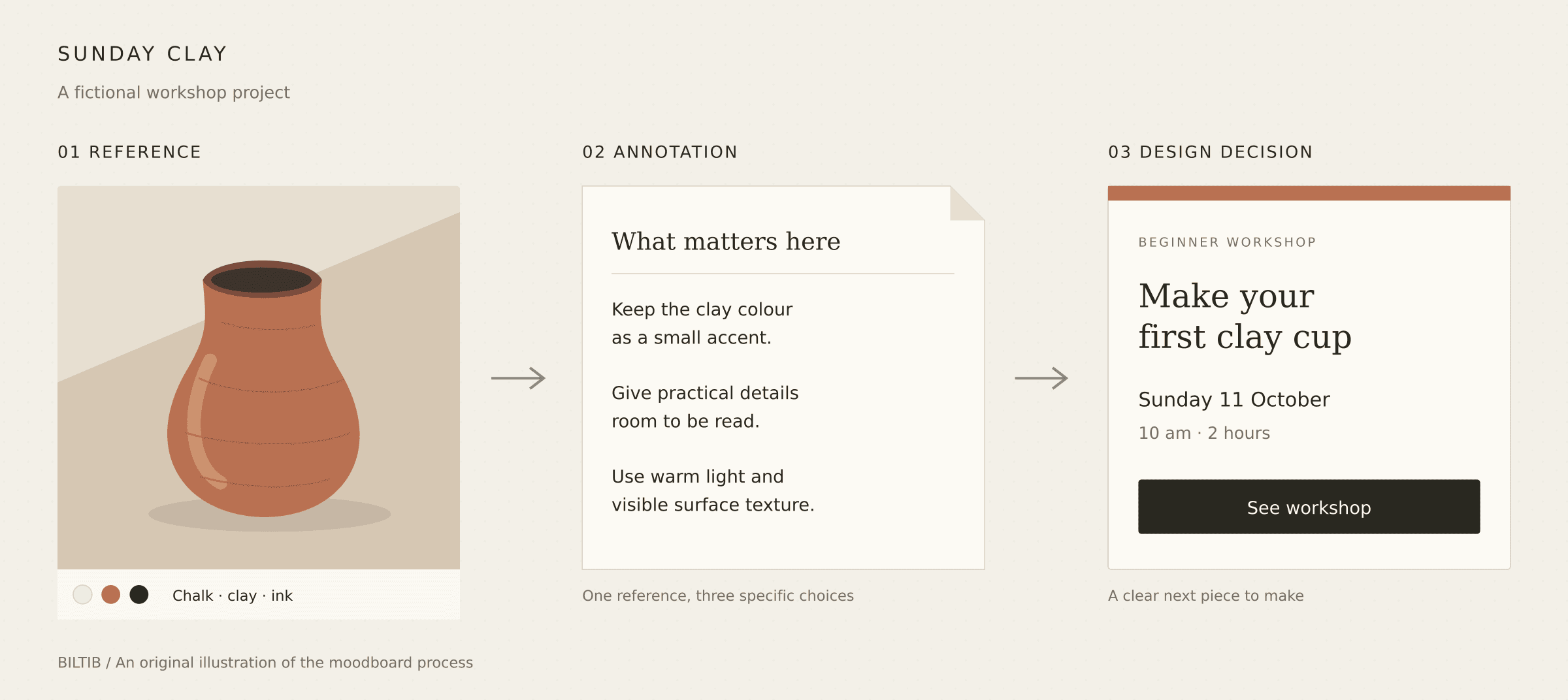
Sunday Clay is a fictional project. This original illustration shows how a reference becomes a design decision.
You saved the photograph for its light. The poster for its lettering. The website for something you cannot quite name. A few weeks later, the collection has grown, but the project is still waiting.
A useful moodboard makes those choices clearer. It puts a small set of references beside the decisions they support: how something should feel, what deserves attention, and what you want to make next.
Here is a practical way to build one.
Start with one real job
Before opening a design tool, write one sentence about the project. For this guide, we will use a fictional ceramics workshop called Sunday Clay:
“Create a welcoming website that helps first-time visitors understand the workshop and find the next available class.”
That sentence gives the board something to answer. A photograph might help the studio feel approachable. A layout reference might show how to make dates easy to scan. A beautiful image that does neither can stay in your wider collection.
Add three words describing the intended feeling. Ours are warm, tactile, and straightforward. Make them specific enough that you could explain what each means on the finished page.
Choose eight to twelve references
Start with a small shortlist. Eight to twelve references is a useful working constraint, especially for a first board. Look for a mixture:
• Two or three images that establish the overall atmosphere
• A couple of references for colour or materials
• One or two typography examples
• A layout or composition that helps solve the project's actual problem
• A detail worth exploring, such as an illustration style or photographic crop
These numbers are a starting point. Keep fewer if the direction is already clear.
If you need better source material, our guide to websites like Pinterest covers places to find and collect it. You can also use your own photographs, packaging, books, and sketches.
Keep the creator's name and original source link beside each reference. That makes it easier to revisit the full project and check usage rights later.
Find places to collect visual inspirationSeven alternatives for discovering images, collecting references, and studying creative work.Give every reference a job
Add a short caption explaining what you want to learn from each image. “Love this” will not help much when you return tomorrow. Try:
• “Use side lighting so the surface of the clay stays visible”
• “Give workshop dates this much space around them”
• “Keep the lettering friendly and readable at small sizes”
A single reference can contain several qualities you like, but choose the one that matters to this project.
For Sunday Clay, a busy workbench photograph could suggest an honest, hands-on atmosphere. The caption should say that. Otherwise, someone else might assume you want the photograph's brown palette, its cluttered composition, or its vintage filter.
Choose a tool around the next step
You do not need to move your whole reference library. Bring the shortlist into one workspace and choose the tool that fits what happens next.
Milanote for images with useful context
Milanote is a good fit when the board needs photographs, links, written notes, and a brief in the same place.
Its free account includes 100 cards, such as notes, images, and links, plus 10 file uploads such as PDFs or Word documents. Free-plan images can be up to 10MB each. The allowance is small enough that a focused project board makes more sense than importing an entire archive.
PDF and PNG exports are available. Create a separate project board first: the Home board cannot be exported, and visual exports place the board on a single page. Keep the layout compact if someone needs to read it without zooming.
Milanote for images with useful contextCanva for a tidy page you can send
Canva suits a board that needs to become a simple, composed handoff.
With a free account, you can arrange your own images and text, then export PDF, JPG, or PNG. Canva Free includes 5GB of storage. Use your own uploads and free elements if you want to keep the whole exercise free.
Premium elements can prevent a free download until they are removed or paid for. Transparent PNGs, SVG exports, and several advanced export controls also sit outside the standard free offering. Check the download panel early, before spending an hour arranging a template.
Canva for a tidy page you can sendFigJam for discussing a direction together
FigJam is useful when a teammate needs to move references around, leave notes, and help choose a direction.
Figma's free Starter plan includes three FigJam files in its team folder and unlimited drafts. The distinction matters: collaborators invited to Starter drafts get view access, so use a team-folder file when you need shared editing. Everyone in that Starter team can access its folder.
PNG, JPG, and PDF export are supported on any plan for people with edit access. Start with a free Figma account and check the board's location and permissions before inviting anyone.
FigJam for discussing a direction togetherExcalidraw for a quick board without an account
Excalidraw is worth considering when you want to start immediately. Its free browser editor combines images, text, arrows, and drawing on an open canvas.
Documented exports include PNG, SVG, and an editable .excalidraw file. The editor saves locally in browser storage, so download an editable copy regularly. Browser storage can disappear, and a local board will not automatically follow you to another device.
Choose it for a loose working board with annotations and sketches. If you already use one of the other tools, there is little reason to switch just for this exercise.
Excalidraw for a quick board without an accountArrange the board so someone can read it
Put the project sentence at the top. Give the strongest atmosphere reference the most space, then group the remaining material by the decisions it supports. For Sunday Clay, that might mean:
• Photography: daylight, visible tools, people making things
• Colour and materials: chalk, terracotta, dark ink
• Type and layout: readable details, generous spacing, clear dates
Keep captions close to their images. Leave enough space between groups that their relationship is obvious.
If two directions compete, make two smaller boards. Name each clearly and compare them against the same project sentence. Combining everything too early makes it harder to see what you are choosing.
Turn the board into a short brief
Write down what the references now tell you to do. Here is the fictional Sunday Clay example:
Audience: People curious about ceramics who have never attended a class.
Purpose: Help them understand the experience and choose a workshop date.
Visual direction: Warm daylight, tactile surfaces, and simple typography. Photograph tools in use and work in progress.
Design decisions: Use a light background with dark, readable text. Keep clay colour as an accent. Show the workshop name, date, duration, and booking action together.
Avoid: Tiny handwritten text for practical information, elaborate motion around booking, and photographs that make the class look intimidatingly advanced.
First thing to make: One mobile workshop card and the top section of the homepage.
This brief is an example you can adapt. For your project, include the choices the board actually supports and leave unresolved questions visible.
Make one small thing before collecting more
Use the board to make a rough first piece: a poster, a workshop card, a room layout, or one screen. Then ask three questions:
• Which reference helped me make a decision?
• Which part of the design still feels unclear?
• What specific reference would resolve that uncertainty?
If the date is difficult to read, look for clearer information hierarchy. If the photography feels too formal, look for a more natural way to show the activity. Search for the missing answer.
Before sharing the board, check its access settings and open the exported file to make sure the captions are readable. Keep reference material clearly labelled, and use your own or appropriately licensed assets in the finished work.
The useful stopping point is when you can explain the direction and make the next piece. Save the wider collection for another day.
About this guide
Tool limits were checked against official product documentation on 30 September 2026. The workflow and fictional brief are Biltib's editorial guidance. This is a researched guide, not a full hands-on benchmark.
Keep your useful discoveries together
Sign in to Biltib to make collections of the discoveries you want to return to.
Keep your useful discoveries togetherSign in to make your own collections on Biltib.Turn your moodboard into a finished piece
Use the free Sunday Clay kit: a worked example, checked color pairs and two blank worksheets. Download the PDF or editable Excalidraw board without signing up.
Free design kitGet the free Moodboard to Finished Design kit